Stripe Invoice Generator, No Stripe Account Needed
The Stripe-style template is here as a layout you fill in and download. No payments account, no products to configure, no dashboard to learn. Add your logo, pick the currency, press Download PDF.
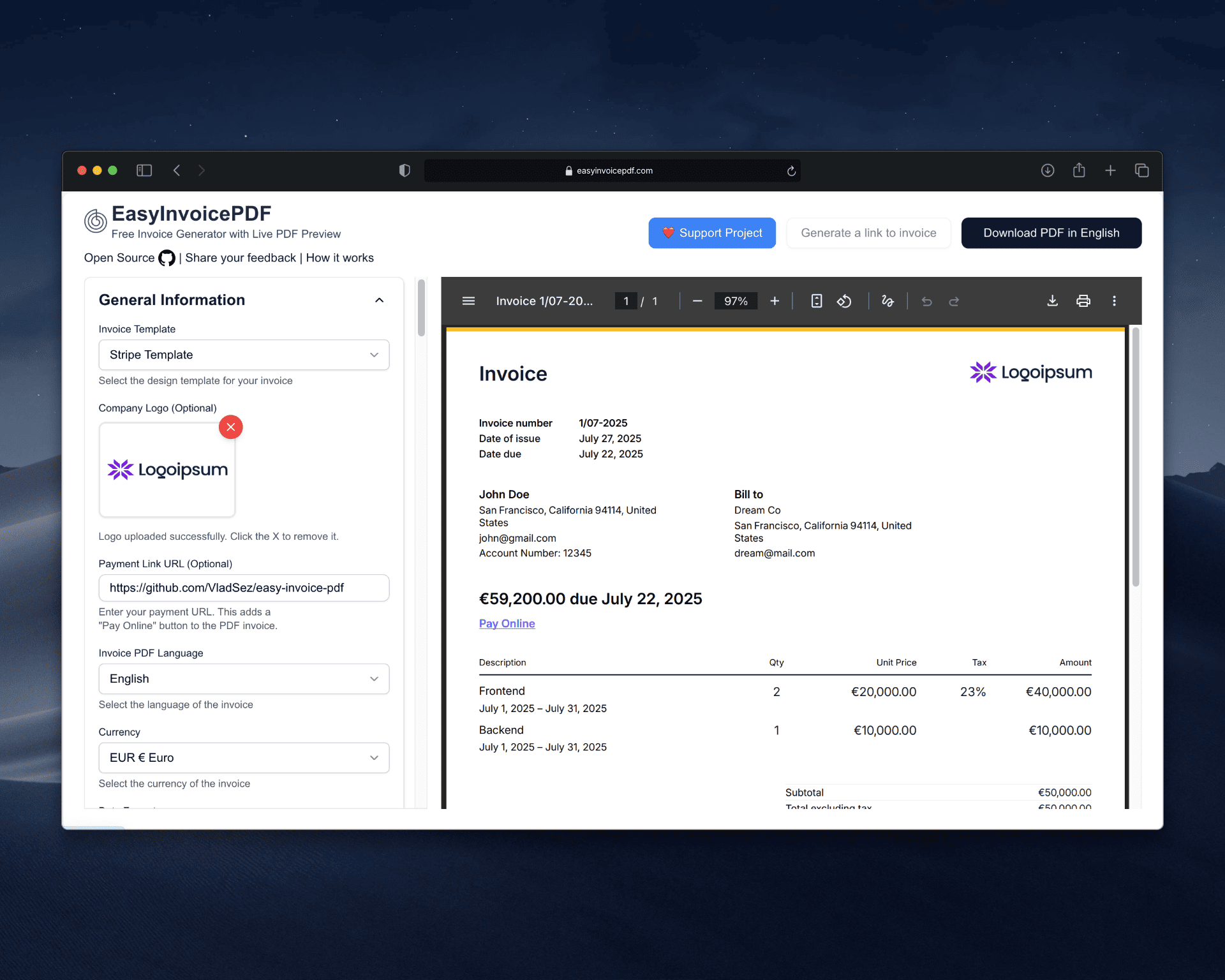
The Stripe-style invoice layout, No Stripe account and no dashboard, Your logo on the invoice, 122 currencies and 13 languages, Free, with no signup
What you get, and what you do not
- Stripe account
- Not needed, and nothing is sent to Stripe
- What you get
- An invoice PDF, downloaded or sent as a share link
- What you do not get
- Card payments, subscriptions, reminders, reconciliation
- Templates
- The Stripe-style layout, plus a plainer default one
- Your logo
- JPEG, PNG or WebP, up to 3MB
- Currencies
- 122
- Languages on the PDF
- 13
- Price
- Free
When Stripe is more than the invoice needs
Stripe Invoicing sits on top of a payments account. Before it prints anything there is a business profile to complete, products or prices to define, and a dashboard to find your way around.
That is the right trade when you are collecting card payments on a schedule. It is a lot of setup for a one-off document that a client will pay by bank transfer anyway.
What this does instead
One job: lay out an invoice and render it to PDF. The form is on one side, the finished document on the other, and it redraws as you type.
You still get paid the way you already get paid. Put your bank details, your payment link or your terms in the payment fields and send the file.
Ready to try it?
The form opens with an empty invoice. Fill it in and download the PDF. No account needed.
Against Stripe Invoicing
Stripe Invoicing is part of a payments platform. This is a document generator. The difference shows up in what you have to set up before a PDF exists.
| EasyInvoicePDF.com | Stripe Invoicing | |
|---|---|---|
| Account before the first invoice | ❌ None | ✅ Required |
| Business details verified first | ❌ No | ✅ Yes |
| Stripe-style layout | ✅ Yes | ✅ Yes |
| Invoice data stays on your device | ✅ Yes | ❌ No |
| Collects card payments | ❌ No | ✅ Yes |
| Price | ✅ Free | ⚠️ Paid |
The Stripe-style template
The second template follows the layout people recognise from Stripe invoices, which is the one most accounts teams have already seen.
- Your logo at the top, as a JPEG, PNG or WebP up to 3MB
- Long-form dates, such as December 17, 2025
- Amounts formatted the way the invoice language writes them, so SEK prints as 1 234,56 kr
- To pay, Paid and Left to pay, so a part-paid invoice is still legible
- The total repeated in words, in whichever of the 13 languages you picked
This is not billing software
Wave, Zoho Billing and QuickBooks do the accounting around an invoice: ledgers, tax filing, reminders and reconciliation. This does none of that, and it makes no compliance guarantees.
If you already run one of those and need a clean PDF for a client outside it, this is faster than opening the suite. If what you need is the ledger, keep the suite.
Create the invoice and download it
Four steps, and nothing to set up first.
- Open the generator with the Stripe-style template selected.
- Upload your logo and fill in the seller and buyer blocks.
- Add your line items and watch the preview redraw as the totals change.
- Press Download PDF, or send your client a share link.
FAQ
Do I need a Stripe account?
No. Nothing here touches Stripe. The template borrows the layout, and the PDF is built in your browser.
Can I accept payments through it?
No. It lays out the invoice and exports the PDF. Collect the money through your bank, your card processor or a payment link you paste into the payment fields, then record it on the invoice.
Is this the same document Stripe produces?
It is a look-alike layout, not a Stripe product, and it carries no Stripe branding. The shape and typography will be familiar to anyone who has processed a Stripe invoice.
Can I put my own logo on it?
Yes. Upload a JPEG, PNG or WebP up to 3MB and it prints at the top of the Stripe-style template, and on the default template too.
Can I move to Stripe later?
Yes. Nothing here is a billing platform you have to migrate off. Adopt Stripe or any other processor whenever the invoicing volume justifies it.
Is this billing software like Wave or Zoho?
No. Those are accounting suites that keep ledgers, chase payments and help with filing. This produces an invoice PDF and stops there.
Do I need an account here?
No. There is no signup and no email step, and the invoice never leaves your browser during normal editing and PDF generation.
Does it have ads?
No. No ads, no tracking pixels and no third-party scripts, which keeps the page fast.